Almost every week or so I get a message from people on YouTube asking me to review their channel. Now I'm in no way a professional YouTuber and I don't try to present myself as one, but I do have over a thousand subscribers, and I feel that I know enough about SEO and presenting your channel properly that I can help people who are just starting out or people who started out a while ago but still don't have the amount of views that they want to have.
The questions are usually something like this: "I started YouTubing a while ago, and I still don't have a lot of views, can you check out my channel and tell me what I need to improve on?"
So usually I check out the channel and I find out that they started out YouTubing one or two weeks ago, maybe a month ago, and more often than not their view count as at around 0 to 5 views per video which is normal when you're starting out, but to them it seems like something is wrong because they compare themselves to big YouTubers like PewDiePie, PauseUnpause, Warowl, etc...
One thing you have to realize when you just starting out is that you're not going to get a lot of views right away. You're going to have to record at least 50, or maybe even 100 videos before you get your first real fan or subscriber that is going to stay with you until you're have a 1000 or even 10,000 subscribers.

Showing posts with label YouTube SEO. Show all posts
Showing posts with label YouTube SEO. Show all posts
Monday, April 6, 2015

Wednesday, January 14, 2015
The Most Comprehensive Guide To YouTube SEO
 Whether you're just starting out on YouTube, or
 you're a hardened YouTube veteran, you can always learn something new about YouTube SEO.
This is the most comprehensive guide about it on the web. (Excluding the YouTube PlayBook and Creator Studio which a lot of people haven't heard of.)
When I just started out, I had to spend hours on google searching and reading tiny 200 word articles about YouTube SEO.
They were useful, but I wished someone compiled all of the most useful content into one big post, and that's what I did here!
This is everything I've ever learned about SEO, from watching Creator Studio videos, reading blog posts, or spending time on Reddit. Everything is here!
For each part of the YouTube ranking puzzle I will write what worked for me, what worked for other people, and what the Key Takeaway for that puzzle piece is.
I run a gaming channel, so most of the examples will be related to gaming channels, but the following SEO information applies to all YouTube channels!
I've spent many hours writing, editing, and finding content for this post so I hope you find it useful!
This is my biggest post so far, so if you would like to skip around, you're more than welcome to!
Click on the links below to jump to the respective part of the post!
- Keyword Research
- Watchtime
- Content
- Authority
- Titles
- Descriptions
- Tags
- Captions/Transcriptions
- Viewer Engagement
- Thumbnails
- Small Tweaks
- Bonus Information
- Links to more information
Who Am I?
 I am a let's play video creator who's had some success with getting his videos to rank high on YouTube, and who would like to share my (and other people's tips) with you.
I have a video in the number 2 spot for the keyword "AVA Gameplay", in addition to 4 other videos that are in the top 20 for that same keyword.
I also have a video in the number 1 spot, 4 spots above PewDiePie, for the keyword "Soccer physics pc", another number 1 video for "Chick can fly", and numerous other high ranking videos.
Anyway, enough about me!
Let's get started with what you're really here for!
Sunday, December 14, 2014
Mistakes We Made When Starting A Gaming Channel (And What We Can Learn From Them)
We've all made mistakes during the first phase of running our YouTube channel, and to prevent others from making the same mistakes, I asked for the ones others committed on the /r/letsplay sub.

The problem is usually the fact that as you post that many videos per day, the quality of your videos will often degrade. And even if you're able to record and post that many videos every day, it's bound to get tedious sooner or later...
.png "MittenSquad Banner")
People might not unsub, but once you come back, your view count will drop and it will be harder to get back the momentum that you might've had going before.
If you do have to take a break, you can explain it to your subs and pre-record one or two videos and schedule them to go up once a week while you're taking your break.
Focusing on money or becoming famous is bound to demotivate you because unless you get extremely lucky or you have something truly different to offer, your channel won't grow very fast.
Hooked later said, "I realized I was thinking this all wrong. Having fun is the number one thing. Stressing about getting noticed and growing my channel isn't something I need to aim for. I need to aim for making fun videos, and hope I can brighten someone's day."
This is one of the best mindsets you can have when just starting out on YouTube. Having fun and not focusing too much on the numbers is the best thing you can do.

Here's what they said!
The Quotes

My biggest mistake was uploading too much too often, early on in my channel I would upload 5 - 6 videos daily, all of different games, and a few co-op games, I over loaded my channel with too much content too quickly. (We now upload 3 videos daily, 1 main, 1 co=op and 1 secondary) -- Cadacis (TheCatalyst)This isn't the most common mistake amongst beginners, but it still happens sometimes.
The problem is usually the fact that as you post that many videos per day, the quality of your videos will often degrade. And even if you're able to record and post that many videos every day, it's bound to get tedious sooner or later...
.png "MittenSquad Banner")
It wasn't when I was starting out, but I did fuck up pretty badly. I started making Let's Plays in August of 2013. Until about late December, I was gaining a few subscribers each week, usually like 3 or 4. In January that tripled. I was getting like 15 per week. It went up to around 20 per day for a few days in February. I was getting as many views per video as I had subscribers. Then, for whatever reason, I lost all will to record and edit and do all of that stuff. I took what I thought was going to be a 1 week break. That turned into 3 months. I started making videos again in late May. It took until early November to get back to where I was in January.If your channel starts experiencing growth, not posting videos for a week or more can really hurt you.
Moral of the story; Unplanned Breaks can seriously fuck up your channel. -- iAmMitten1 (MittenSquad)
People might not unsub, but once you come back, your view count will drop and it will be harder to get back the momentum that you might've had going before.
If you do have to take a break, you can explain it to your subs and pre-record one or two videos and schedule them to go up once a week while you're taking your break.
My biggest mistake was my attitude at the beginning. I treated this like something I needed to stress over and succeed with. I did make sure I had fun, but there was too much focus on "gotta get noticed!" and "have to upload NOW!" -- HookedOnAnAnchorThe mindset with which you start out YouTubing is very important.
Focusing on money or becoming famous is bound to demotivate you because unless you get extremely lucky or you have something truly different to offer, your channel won't grow very fast.
Hooked later said, "I realized I was thinking this all wrong. Having fun is the number one thing. Stressing about getting noticed and growing my channel isn't something I need to aim for. I need to aim for making fun videos, and hope I can brighten someone's day."
This is one of the best mindsets you can have when just starting out on YouTube. Having fun and not focusing too much on the numbers is the best thing you can do.

WORST MISTAKE: Tried to specialize in one game (Warframe) from the beginning of the channel. It was fine and gained a fair amount of subs because of it, but as I moved on I stopped playing warframe and the channel has taken a different direction. Because of this, I do lose subs fairly regularly because many of them came from my warframe videos (which I dont produce any more), but luckily my gains from my newer videos still out weight the lose. -- Aldershot8800This seems to be a mistake that many gamers make when just starting their YouTube channel. (I actually made the same exact mistake with Alliance Of Valiant Arms).
Tuesday, October 21, 2014
Are Custom YouTube Thumbnails Really THAT Important?
Are custom YouTube thumbnails really that important?

Nine out of ten YouTubers would answer with a resounding yes, and I mostly agree with them.
However, none of them explain why good-looking thumbnails increase the ranking of your videos, or in some cases- why they don't help the rankings at all.
First of all, let's talk about why custom thumbnails can actually increase your rank. It's not like once you add a custom thumbnail, the YouTube ranking system will go "BOOM" and increase your rank right away.
What the custom thumbnails are actually there for is for drawing in more viewers who are truly interested in your video and for increasing watchtime.
Watchtime is key for ranking your video. A long time ago, YouTube changed the ranking system so watchtime would be the most important thing for increasing your video's rank. In fact, almost everything you do to increase your rank is an attempt to increase watchtime. (Yes, even improving tags and descriptions. At least in part)
So ultimately the goal of a custom thumbnail is to show what your video is all about, to get more viewers that will watch your video for a longer time, and stand out from other videos that appear on the search page.
If you had to choose between two videos with the same title with one of them having a well-made custom thumbnail, and the other having a random thumbnail. Which one would you watch? I'm guessing the better looking one. (Unless your video is the one with the random thumbnail ;) )
Someone who has incredibly well made thumbnails is PewDiePie. His thumbnails are eye-catching, usually have a face with an interesting expression, and they draw people in. And I mean.... He has over 30,000,000 subscribers so he must be doing something right! Right? Let's look at his most recent uploads and see if he makes custom thumbnails for every single one of his videos. Oh! Yes! He does! Anyway...

So what makes a good thumbnail?
It has to be interesting, shouldn't have a lot of text, and should let the viewer know what your video will be about.
Gone are the days of people putting sexual content in the thumbnails just for the sake of getting a view. Now if you get many clicks, but your watchtime is incredible low, YouTube will count that against you.

Should you really make custom thumbnails for every single one of your videos? At this point, I try to do it for every single one of my videos if I can. Even something simple like picking a good-looking frame from your video, screenshotting it, and putting the episode number and the game name on there goes a long way.
As an example, let's look at the thumbnails for the search term "Evil within gameplay". As you can see, five out of the six top videos have a custom thumbnail, and the video that doesn't have one is Bethesda's first gameplay video so they don't need a custom thumbnail. Which video would you rather click if you didn't know the titles or the people who created it?
Personally I really like the second one because the red really jumps out at me, and the last one looks very nice also.
All of these are simple and well-made and make me want to watch these videos!
To answer the question asked in the title of this post- yes, custom thumbnails are definitely very important, if you know how to make them properly, and you realize why they are important.

Nine out of ten YouTubers would answer with a resounding yes, and I mostly agree with them.
However, none of them explain why good-looking thumbnails increase the ranking of your videos, or in some cases- why they don't help the rankings at all.
First of all, let's talk about why custom thumbnails can actually increase your rank. It's not like once you add a custom thumbnail, the YouTube ranking system will go "BOOM" and increase your rank right away.
What the custom thumbnails are actually there for is for drawing in more viewers who are truly interested in your video and for increasing watchtime.
Watchtime is key for ranking your video. A long time ago, YouTube changed the ranking system so watchtime would be the most important thing for increasing your video's rank. In fact, almost everything you do to increase your rank is an attempt to increase watchtime. (Yes, even improving tags and descriptions. At least in part)
So ultimately the goal of a custom thumbnail is to show what your video is all about, to get more viewers that will watch your video for a longer time, and stand out from other videos that appear on the search page.
If you had to choose between two videos with the same title with one of them having a well-made custom thumbnail, and the other having a random thumbnail. Which one would you watch? I'm guessing the better looking one. (Unless your video is the one with the random thumbnail ;) )
Someone who has incredibly well made thumbnails is PewDiePie. His thumbnails are eye-catching, usually have a face with an interesting expression, and they draw people in. And I mean.... He has over 30,000,000 subscribers so he must be doing something right! Right? Let's look at his most recent uploads and see if he makes custom thumbnails for every single one of his videos. Oh! Yes! He does! Anyway...

So what makes a good thumbnail?
It has to be interesting, shouldn't have a lot of text, and should let the viewer know what your video will be about.
Gone are the days of people putting sexual content in the thumbnails just for the sake of getting a view. Now if you get many clicks, but your watchtime is incredible low, YouTube will count that against you.

Should you really make custom thumbnails for every single one of your videos? At this point, I try to do it for every single one of my videos if I can. Even something simple like picking a good-looking frame from your video, screenshotting it, and putting the episode number and the game name on there goes a long way.
As an example, let's look at the thumbnails for the search term "Evil within gameplay". As you can see, five out of the six top videos have a custom thumbnail, and the video that doesn't have one is Bethesda's first gameplay video so they don't need a custom thumbnail. Which video would you rather click if you didn't know the titles or the people who created it?
Personally I really like the second one because the red really jumps out at me, and the last one looks very nice also.
All of these are simple and well-made and make me want to watch these videos!
To answer the question asked in the title of this post- yes, custom thumbnails are definitely very important, if you know how to make them properly, and you realize why they are important.
Thursday, October 16, 2014
How To Pick YouTube Keywords Using VideoLC
 What do you do to pick keywords for your YouTube video?
Do you put random words? Use the YouTube Search Check? Use VidIQ to check your competitors keywords?
I use all of the above strategies, but another tool that I found out not long ago is called VideoLC.
It is a paid service, but they have a very general 30 day trial that I'm using right now to rank my videos, find the best time to post my videos, and see whether my videos are going up in rank or not.
You can greatly improve your channel without buying any licenses! The 30 day trial is more than enough to do all of the things I describe below!
It's an incredibly versatile tool, and in the 30 days that you get the free trial for, there are loads of things you can do to improve your channel. (I' m considering buying the cheapest monthly subscription when I have a steady income)
How To Pick Keywords
 If you've read my blog before, you'll know that I like to utilize the YouTube Search Check to see which keywords are low competition and post videos based on that keyword.
VideoLC greatly simplifies your job of keyword searching.
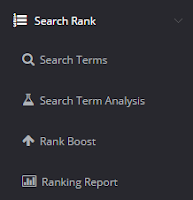
All you have to do is go to the search rank button and then click on the Rank Boost button.
We're not using it for boosting your rank just yet, that's the next section, but we will be using their rank boosting tool for keyword researching.
When you're there, click on the Add A Rank Boost button, and you'll be taken to a page that looks like the one to the right except your fields will be empty.
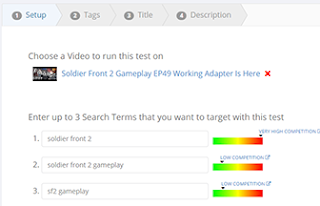 Since you're not actually trying to improve the rank of your video, you can choose whatever video you want. Don't worry, this won't affect your video whatsoever.
There's a box where you can enter search terms that "you want to target", but we'll be using it to see what kind of competition a keyword has.
For this example I will be using keywords actually related to my video, but you can research any keyword you want.
What happens after you enter your keyword is pretty self-explanatory, but here are some simple details on it.

As you can see, trying to rank my video for the tag "soldier front 2" would be nearly impossible unless you're already a very successful channel.'
That keyword has very high competition, so that's not something you'd want to focus on.

The tag "soldier front 2 gameplay" has much lower competition, and it's much easier to rank for it.

And the tag "sf2 gameplay" isn't bad either!
How would you use this?
When looking for a game to record, you can visit this website and see if you have any chance in ranking high for the game you're about to play.
For example, let's say you want to play one of the Indie games shown below found on the Desura website.

You could put in the game names with gameplay at the end of them and see how high the competition is.

Looking at the above results, it looks like playing the game called So Many Me is a terrible idea if you're trying to get some views from YouTube search.
Playing Pall seems like a pretty good option, and playing The Scarecrow Man is a fairly good idea!
How To Find The Best Time To Post Your Videos
I've often heard people ask how to determine the best time for posting your videos, and it is quite hard to do it all by yourself.
However, VideoLC does all of the heavy lifting for you and all you have to do is click a button and view the amazing results!
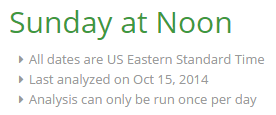 Just go to the Channel menu and click on Best Time To Upload.
You'll get a message about your best time for uploading, (Mine is on Sunday between 12 and 1) and below that you will find numerous details about your engagement based on the day of the week.
 Most of my engagement seems to happen on Sundays, which is why this app told me that my best bet is publishing my video on a Sunday!
Now you could analyze it all yourself, or write your own program to do it for you, but I prefer not reinventing the wheel if what I want is already out there.
Check How Your Videos' Rank Is Changing
You can also use VideoLC to track the changes in your videos' rankings.
The only disadvantage to this feature is that it only tracks videos in the top 50 for a certain keyword, so if your video isn't already ranked fairly high, you're out of luck!
To do this, go into the Search Rank menu and click on Ranking Report.
If it's your first time going here, you'll have to choose the keywords for this tool to check for, and you'll have to wait a couple days for it to see whether your rankings are changing or not.
Thank you for reading and I hope this post was useful to you!
You can click below to subscribe to my newsletter if you would like to get case-studies and tips like these delivered straight to your inbox!
You can greatly improve your channel without buying any licenses! The 30 day trial is more than enough to do all of the things I describe below!
It's an incredibly versatile tool, and in the 30 days that you get the free trial for, there are loads of things you can do to improve your channel. (I' m considering buying the cheapest monthly subscription when I have a steady income)
How To Pick Keywords
 If you've read my blog before, you'll know that I like to utilize the YouTube Search Check to see which keywords are low competition and post videos based on that keyword.
VideoLC greatly simplifies your job of keyword searching.
All you have to do is go to the search rank button and then click on the Rank Boost button.
We're not using it for boosting your rank just yet, that's the next section, but we will be using their rank boosting tool for keyword researching.
When you're there, click on the Add A Rank Boost button, and you'll be taken to a page that looks like the one to the right except your fields will be empty.
 Since you're not actually trying to improve the rank of your video, you can choose whatever video you want. Don't worry, this won't affect your video whatsoever.
There's a box where you can enter search terms that "you want to target", but we'll be using it to see what kind of competition a keyword has.
For this example I will be using keywords actually related to my video, but you can research any keyword you want.
What happens after you enter your keyword is pretty self-explanatory, but here are some simple details on it.

That keyword has very high competition, so that's not something you'd want to focus on.

The tag "soldier front 2 gameplay" has much lower competition, and it's much easier to rank for it.

How would you use this?
When looking for a game to record, you can visit this website and see if you have any chance in ranking high for the game you're about to play.
For example, let's say you want to play one of the Indie games shown below found on the Desura website.

You could put in the game names with gameplay at the end of them and see how high the competition is.

Playing Pall seems like a pretty good option, and playing The Scarecrow Man is a fairly good idea!
How To Find The Best Time To Post Your Videos
I've often heard people ask how to determine the best time for posting your videos, and it is quite hard to do it all by yourself.
However, VideoLC does all of the heavy lifting for you and all you have to do is click a button and view the amazing results!
Just go to the Channel menu and click on Best Time To Upload.You'll get a message about your best time for uploading, (Mine is on Sunday between 12 and 1) and below that you will find numerous details about your engagement based on the day of the week.

Now you could analyze it all yourself, or write your own program to do it for you, but I prefer not reinventing the wheel if what I want is already out there.
Check How Your Videos' Rank Is Changing
You can also use VideoLC to track the changes in your videos' rankings.
The only disadvantage to this feature is that it only tracks videos in the top 50 for a certain keyword, so if your video isn't already ranked fairly high, you're out of luck!
To do this, go into the Search Rank menu and click on Ranking Report.
If it's your first time going here, you'll have to choose the keywords for this tool to check for, and you'll have to wait a couple days for it to see whether your rankings are changing or not.
Thank you for reading and I hope this post was useful to you!
You can click below to subscribe to my newsletter if you would like to get case-studies and tips like these delivered straight to your inbox!
Friday, October 3, 2014
Top 50 Most Useful Websites For A YouTube Gaming Channel (And Not Just Gaming!)
 Making YouTube videos is absolutely amazing, but it can get quite hard at times, and if you're a gaming channel on YouTube, you have even more competition than others.
You have to keep your viewers happy, deliver quality content, make sure you're not breaking any copyright laws, and find music and images for your videos, all while making sure your content is better than the content of all the other gaming channels out there.
This list will help you simplify that job and make you life as a YouTuber much easier!
There are 5 sections total, each with 10 websites:
There's even a bonus section at the end!
1-10. Top 10
 1. How to monetize gaming videos legally. This is probably one of the most useful posts on the internet for a YouTube who records video games, because it shows you which companies allow you to monetize their gameplay and which ones don't.(http://www.wholetsplay.com/wiki/doku.php)
2. SocialBlade. A very useful tool for analyzing yours, and your competitors' channels. (http://www.socialblade.com/)
3. vidIQ Vision. One of the most useful tools ever for analyzing your competitors tags, social engagement, watchtime, and other numerous statistics about their videos so you can beat them. (http://vidiq.com/apps/vision/)
4. YouTubeGaming Forum. The biggest forum for YouTube Gamers out there. You can share your videos here to get some backlinks and views from other games on YouTube. You can also get feedback on your channel, videos, or talk about life. (http://youtubegaming.com/forum/)
5. AlphaBetaGamer. An incredibly useful website that summarizes all of the latest free alpha and beta games and tells you if there are any key giveaways happening for those games. Great place to find free games to record! (http://www.alphabetagamer.com/)
6. Sumo Paint. An absolutely amazing online alternative to Photoshop. If you don't have Photoshop and you don't want to use GIMP, you can use this online website to create your thumbnails! (http://www.sumopaint.com/app/)
7. Desura. Why do I have Desura on here? Simply because you can find new IndieGames on here and record them for YouTube before most of the people hear about them. You can be a YouTube hipster and record it first. That way you'll stay on top of the search results later on! (http://www.desura.com/)
 8. Coursera. Why am I putting an educational website on here you ask? In my opinion educating yourself is the most important thing to do no matter what your hobbies or jobs are. Even if you learn things not related to YouTube, you might make the weirdest connections between what you learned and YouTube or your job which will help you become much more successful. (https://www.coursera.org/)
9. Twitter. Yes, twitter is on here. Why? Simply because it's a great way to get some more clicks to your video, and YouTube likes if your video is shared on Twitter, so you should share some of yours! Just don't share every single video you have because then your twitter newsfeed would be full of junk. (https://twitter.com/BeatDaBest)

10. Fiverr. If you don't want to create your own thumbnails, caption your own videos, or you want backlinks to your video you can order services on here for only $5! (https://www.fiverr.com)
11-20. Free Music
 11. Audionatix. My favorite website for free music for YouTube videos. All of the songs are there are free to download and use commercially, and there are loads of songs so you don't have to repeat them! (http://audionautix.com/)
12. BFXR. This isn't a free music website, but it's a free sound effect website. You can use it to make random sound effects for your video. I haven't used it myself yet, but if you want to spice your videos up a bit, you can use it. (http://www.bfxr.net/)

13. Newgrounds Audio. Newgrounds has plenty of free music that you can use in your videos. However, most of the songs are free with non-commercial use if you give attribution to the artist. If you want to use it commercially, you should probably talk to the artist. (http://www.newgrounds.com/audio/)
14. Free Music Archive. Not all of their songs are free for commercial, video use, but you can use their search function to find songs that allow for commercial use. At the time of writing there's over 4465 songs on there. That's pretty good, right? (http://freemusicarchive.org/curator/video)
15. YouTube Audio Library. Even though a lot of the songs on here are overused, with a couple minutes of searching you could find a new song. They also have a couple of high quality sound effects if you need them! (https://www.youtube.com/audiolibrary/)
16. FreeSound. They have loads of completely free sound effects on their website. The only catch? You have to register which takes a couple seconds of your time... (https://www.freesound.org)
 17. FreeStockMusic. Great free music for any type of video you can think of. You do need to register to download it, but it's definitely worth it! (http://www.freestockmusic.com/)
18. Incompetech. You can find numerous great tracks here that were composed by Kevin McLeod. They're completely free to use and download, but you have to give him credit for it either in the video or the description. (http://incompetech.com/)
19. DanoSongs. Another composer's site. He also allows his songs to be used anywhere if you give him the credit in the description or your video. (http://www.danosongs.com/)
20. PublicDomain4U. This website has all of the songs that have the copyright expired, so if you're looking for oldies but goodies this is the site for you! (http://publicdomain4u.com/)
21-30. Free Photos
 21. Free Digital Photos. This is my number one choice for when I need photos for my thumbnails or blog. It's not the best one out there because it only lets you download small sized images (400*267) pixels for free and you have to pay for the other ones. However, it's perfect for my uses. (http://www.freedigitalphotos.net/)
22. Unsplash. 10 completely free to use, breathtaking images every 10 days. What's not to love? (https://unsplash.com/)
23. SnapWireSnaps. Same as above, except there are 7 images uploaded every 7 days. (http://snapwiresnaps.tumblr.com/)
24. Getrefe. More free, public domain pictures. They were all taken using cellphones, but there are some amazing ones on there. (http://getrefe.tumblr.com/)
 26. Superfamous. A Los-Angeles based studio of a Dutch photographer. All of the photos there are free to use, but you need to give him credit. (http://superfamous.com/)
27. Life Of Pix. More public domain images. (http://www.lifeofpix.com/)
 28. LittleVisuals. This one is a bit different from all the others because you actually have to sign up with your email, and they send you 7 free images every 7 days. Definitely worth it if you're a free image hoarder. (http://littlevisuals.co/)
29. Gratisography. Pictures captured by Ryan McGuire that are free of any copyright restrictions. Use them however you want! (http://www.gratisography.com/)
30. Splitshire. A blogger who is offering all of the pictures on the blog for free to use however you want. (http://splitshire.com/)
31-40. Cheap Games
31. Cheapshark. Technically, I could simply put this website here and not put anything else because this website collects the price data from the best game-stores online and checks which ones have the best deal. Definitely a must have if you're looking for cheap games. (http://www.cheapshark.com/)
32. Origin Free Games. Origin has a program called On The House where they post one or two games a month completely for free and if you download them during that time period you have those games forever! (https://www.origin.com/)
33. Green Man Gaming/Hot Deals. One of the websites Cheapshark checks for deals. If you want to do it manually you can go to their Hot Deals page! (http://www.greenmangaming.com/hot-deals/)
 34. The Humble Bundle. Nowhere on the internet will you find a better deal for as many amazing games as they have on there. (Unless you pirate them) You pay as much as you want, and in many cases you can get 6-10 huge games for only $10 bucks or less. They also have Mobile and IndieGame bundles. (https://www.humblebundle.com/)
35. Steam Sales. If you're willing to wait for the Summer or Winter sale, or if a game you want appears on the Steam midweek madness page, you could get it for cheap! (http://store.steampowered.com/)
36. GOG. Another one of the stores on the Cheapshark list, but you can check them out to see if there's any other deals that aren't listed. (http://www.gog.com/)
37. GetGames. Same as above. They also have a hot deals page that you can check out! (http://www.getgamesgo.com/)
38. Reddit/SteamSwap. Did you know that you can trade games with people if you have a game on Steam that you don't like? Well now you know! (http://www.reddit.com/r/steamswap/)
 39. Amazon. Amazon has some great deals on PC games sometimes. The only disadvantage is that the deals only apply to the physical copies of the game. (http://www.amazon.com/computer-video-games-hardware-accessories)
40. G2A Games. Another one of my favorites. It has incredibly cheap prices on almost all games out there. However, most of the games you buy from other gamers, so make sure that they have a high rating and over 100 sales. (https://www.g2a.com)
41-50+. Other Usefulness
41. SteamAlerts. If you're trying to buy a specific game on sale from Steam, this is a must have. Choose your game, put in your email and set the maximum price you're willing to pay and it will send you and email once the game drops below that price! (http://steamalerts.com/)42. GameLengths. If you're planning on recording a single player game, it might be useful to know how long it will take you to complete the game. That's where this website comes into play! It's user submitted play-times though so your mileage may vary. (http://www.gamelengths.com/#)
43. VideoLC. A really cool website that determines the best time for you to publish your videos based on the engagement that you got on your previous videos and much more. You can get a free trial for 30 days, but it's quite expensive if you want to keep using it. Free trial it is! (https://www.videolc.com)
 44. IGN. I like to visit IGN from time to time to figure out what's going on in the game world. (http://www.ign.com/)
45. YouTube Creator Academy. Creator Academy is a course offered by YouTube for improving your channel. Some of the stuff on there is quite basic, but some of the tips they offer are quite useful, so give it a go! (http://www.youtube.com/yt/creators/education.html)
46. Advanced SEO Tactics To Drive More Traffic To Your Videos & Website. I know... I know... This isn't a website. It is however an incredibly useful blog post by one of my favorite SEO guys on the internet named Brian Dean (author of Backlinko). Definitely worth checking out if you want to make your channel better! (http://searchenginewatch.com/article/2340726/5-Advanced-YouTube-SEO-Tactics-to-Drive-More-Traffic-to-Your-Videos-Website)
47. Ahrefs. You can use Ahrefs to check which websites are creating backlinks to your videos! (https://ahrefs.com/)

48. Backlinko. The blog of one of my favorite SEO experts: Brian Dean. Even though most of his articles are focused on website SEO, you can apply most of the concepts to YouTube videos. (http://backlinko.com/)
49. Market Samurai. This is a program that I use to find good keywords and improve my SEO. It's quite expensive though, so if you don't have a website it might not be worth it. (http://www.marketsamurai.com)
50. BeatDaBest. Did you really think I wouldn't put my website on here? You're crazy! ;) This is obviously my go-to website for improving my YouTube channel and it should be yours too! (www.beatdabest.com)
51. Reddit Let's Play. Another great place to go to if you need some help with improving your channel or you just want to talk to someone like-minded. (http://www.reddit.com/r/letsplay)
52. GamerclipsTV. Another website kind of like YouTube Gaming, except this one looks and feels better. Very useful for getting your videos to rank higher! (http://gamerclips.tv/)
53. Goo.gl. Having big, long, ugly links in the description isn't too pleasing, so you can use goo.gl links to make them shorter and see how many people are clicking on them. Be careful because some people don't trust goo.gl or bit.ly links! (goo.gl)
Bonus Website You Can't Miss (Just Kidding, These Are Completely Useless!)
54. Become A Famous YouTube Gamer. If you follow these steps you're guaranteed to get 1,000,000 subscribers on your first day of YouTubing! (http://www.wikihow.com/Become-a-Famous-YouTube-Gamer)55. OMFGDOGS. Um... Yeah. (http://www.omfgdogs.com/)
56. Falling Falling. It's constantly falling!!! Or is it? (http://www.fallingfalling.com/)
57. Staggering Beauty. Have you ever wanted to shake a black sausage until it turns into a rainbow sausage that flickers? Now you can! WARNING: Contains Flashing Images. (http://www.staggeringbeauty.com/)

58. Eelslap. If something just isn't working you can always slap this guy with an eel! Results may vary. (http://eelslap.com/)
P.S. Some of these are from: http://www.theuselessweb.com/
Thank you for reading! I hope you found this list useful!
Sunday, September 21, 2014
How I Outranked PewDiePie (How To Outrank Your Competitors On YouTube)
 Would you like to outrank all of your competitors and be the first YouTube result for a certain keyword?
Sadly I can't guarantee an outcome like that...
However, I can show you how I outranked PewDiePie for one of his very popular videos, and how you can outrank your competitors using a very simple process.
How I Outranked Pewds
Outranking PewDiePie took some pre-planning, but it was also a stroke of luck.
I found a flash game called Soccer Physics that just came out, and I did a quick YouTube Search Check for "Soccer Physics" and realized that there were already numerous videos out there that would be hard to beat.
I decided not to give up, and did a quick search for "Soccer Physics PC".
Nothing turned up.
I was super happy because I thought I'd be the first person to post some actual computer gameplay of the game, so I could rank pretty high.
 I never thought this game would become so incredibly popular that Pewds, Markplier, and others would play it.
If you search for "Soccer Physics", PewDiePie is the first result and I'm nowhere to be found.
 However if you append PC to the keyword and search for it I will be on the first spot!
Two things stood out to me right away:
- I would need to check my competitors tags and make my tags better, or at least the same as theirs
- I would need to find keywords that none of the top results have in their tags, and put it into my tags
How To Beat Your Competitors
Now let's talk about how you can beat your competitors, and possibly outrank PewDiePie!
First of all you will need a tool called VidIQ. Specifically, you will need their Google Chrome Plugin.
Why do you need it?
 Because it's what allows you to look at nearly ALL of the statistics for your competitors, and then beat them!
Let's look at the statistics for my video and PewDiePie's video.
As you can see, I actually have the words: PC Version, Soccer Physics PC, and flash in my tags.
My video barely has any social involvement, with no FB likes, shares, or comments, and there are only 2 tweets about my video.
However, I am still ranked higher than Pewds, because I have those 3 magic keywords in my tags, title, and description!

I might be able to even rank for other keywords for this video if I get some social engagement, but I'm happy with one number one rank spot in the YouTube Search engine!
PewDiePie has tons of social engagement with over 151 Facebook likes, 154 shares, and a stunning 1,685 tweets!
However, nowhere in his tags does he have the word PC in it, and honestly, he doesn't need it.
Because of his popularity by simply having Pewdipie, pewdie, pewds, and playthrough in his tags, he can rank for those words pretty well.
He is even ranked number one for the search "soccer physics!"
But not "soccer physics PC," which I'm very thankful for!
How This Helps You
Ranking high on YouTube is hard work if you're not a very popular channel, but if you follow my advice here, and you're in the top 3 pages on YouTube, all you have to do is:
- Write down all the keywords you think people would search to get to your video
- Use VidIQ to check your competitors keywords.
- Write down the keywords that the top 3 search results have in common
- Write down the keywords that only the top result has
- Go through the rest of the videos above you, crossing out the keywords from your 3 lists as you go
- When you're done you should have a couple of keywords that you should be able to rank for!
Good luck with ranking your video and thank you for reading!
If you want more information on this, make sure to check out my video on using VidIQ to rank your videos below!
Wednesday, September 3, 2014
Single Player Games VS Multiplayer Games (A YouTube Performance Study)
If you've read some of my other blog posts, you will know that I greatly prefer multiplayer games over single player games for getting more viewers on your gaming channel.

In fact, I had a whole 2,500 word post on what you should and shouldn't record to earn more subscribers and viewers.
You can read that post here.
However, some people are still unconvinced, so I decided to do a little case study of my own YouTube channel and show why I absolutely hate single player games for earning subscribers.
Keep in mind that I LOVE playing single player games, and I even recorded some for my channel, but if your goal is increasing the number of your subscribers or viewers, then there are many other things you can do to get the best bang for your buck.
Single Player Games Dissection
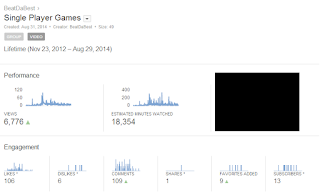 The analytics of all the single-player games I have played are on the right.
As always I can't show you my earnings, but you can see all of the important statistics.
As you can see I have 6,776 views. Which isn't that bad in itself. Until you see that I have 49 videos in this group!
That means that on average every single video I created got 148 views.
 Which wouldn't have been that bad...
However, the Top 10 Videos bar tells a completely different story.
You can see that 3 of my videos account for almost 64% of all my views.
In fact, if I only had my Top 10 videos up, I would have 5,552 views!
 This means that the hours I spend on my 39 videos only yielded 1224 views!
That's only 31 views per video!
Now I don't know about you, but I want more than a measly amount of 31 views per video.
It usually takes me around an hour to record, edit, and upload a 10-15 minute video, so that's around 30 hours I spent, all to get 1224 views...
At the very end of this post, I will do a side-by-side comparison of the views, and engagement per video for multiplayer vs single player games, so stay tuned!
Multiplayer Games Dissection
 What's the first thing that you notice when you look at my Multiplayer Analytics?
Probably the fact that my overall statistics are much higher.
I have a total of 93,429 views which is a pretty high number.
 However, I also have 198 videos in this group, compared to only 49 videos in the single player group, so the increase in views is expected.
The average views per video is still higher than in the single player group! It sits at right around 472 views per video, which isn't bad. But are the Top 10 videos eating up over 81% of my views?
My top 10 videos amount to 63,152 views total, which is right around 67.5%.
What does that mean for the rest my videos however?
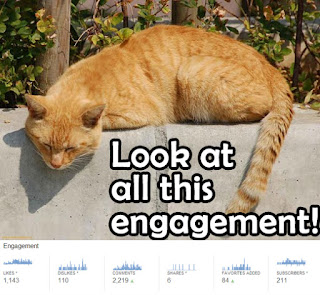 That means that on average, my multiplayer videos not in the top 10, have about 161 views per video.
The best part about all of my multiplayer videos however, is the engagement!
I have over 1000 likes, 2000 comments, and I got over 200 subscribers, just from my multiplayer videos!
I even have over 100 dislikes!
You might be wondering why I'm happy about dislikes, but even dislikes help your video rank higher, because it means someone dedicated his time to pressing that dislike button.
Single Player VS Multiplayer Comparison
Now the moment we've all been waiting for!
Here is the side-by-side comparison of the views and engagement for single player VS multiplayer with the winner of each category bolded:
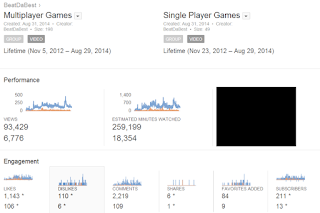 Even though the single-player game videos had more favorites, the multiplayer game videos blew them out of the water in all the other categories.
For those of you who prefer a more graphical way to think about things, here's a YouTube Analytics comparison!
Just click on it to make it bigger!
As you can see, the blue line, easily beats the orange line almost every single time.
What Does This Mean For You?
Does this mean that you should completely stop recording single player games, and completely dedicate your YouTube channel to multiplayer games?
Simply put: NO!
But doesn't that contradict everything that I was just talking about?
 Not necessarily.
It just means you should be more choosy of what single-player games you're recording, and that you should always do the YouTube Search Check, before recording it for YouTube!
It also means that you should play multiplayer games first to build up a base of loyal subscribers and then add some single player games in the mix later.
If you liked reading this post, then you might be interested in my post about what you should record to increase your YouTube views. In that post I go in depth on what you should and shouldn't record, so check it out!
As always, thank you for reading, and please leave a comment if you have any questions!

In fact, I had a whole 2,500 word post on what you should and shouldn't record to earn more subscribers and viewers.
You can read that post here.
However, some people are still unconvinced, so I decided to do a little case study of my own YouTube channel and show why I absolutely hate single player games for earning subscribers.
Keep in mind that I LOVE playing single player games, and I even recorded some for my channel, but if your goal is increasing the number of your subscribers or viewers, then there are many other things you can do to get the best bang for your buck.
Single Player Games Dissection
 The analytics of all the single-player games I have played are on the right.
As always I can't show you my earnings, but you can see all of the important statistics.
As you can see I have 6,776 views. Which isn't that bad in itself. Until you see that I have 49 videos in this group!
That means that on average every single video I created got 148 views.
 Which wouldn't have been that bad...
However, the Top 10 Videos bar tells a completely different story.
You can see that 3 of my videos account for almost 64% of all my views.
In fact, if I only had my Top 10 videos up, I would have 5,552 views!
 This means that the hours I spend on my 39 videos only yielded 1224 views!
That's only 31 views per video!
Now I don't know about you, but I want more than a measly amount of 31 views per video.
It usually takes me around an hour to record, edit, and upload a 10-15 minute video, so that's around 30 hours I spent, all to get 1224 views...
At the very end of this post, I will do a side-by-side comparison of the views, and engagement per video for multiplayer vs single player games, so stay tuned!
Multiplayer Games Dissection
 What's the first thing that you notice when you look at my Multiplayer Analytics?
Probably the fact that my overall statistics are much higher.
I have a total of 93,429 views which is a pretty high number.
 However, I also have 198 videos in this group, compared to only 49 videos in the single player group, so the increase in views is expected.
The average views per video is still higher than in the single player group! It sits at right around 472 views per video, which isn't bad. But are the Top 10 videos eating up over 81% of my views?
My top 10 videos amount to 63,152 views total, which is right around 67.5%.
What does that mean for the rest my videos however?
 That means that on average, my multiplayer videos not in the top 10, have about 161 views per video.
The best part about all of my multiplayer videos however, is the engagement!
I have over 1000 likes, 2000 comments, and I got over 200 subscribers, just from my multiplayer videos!
I even have over 100 dislikes!
You might be wondering why I'm happy about dislikes, but even dislikes help your video rank higher, because it means someone dedicated his time to pressing that dislike button.
Now the moment we've all been waiting for!
Here is the side-by-side comparison of the views and engagement for single player VS multiplayer with the winner of each category bolded:
| Views | Likes | Dislikes | Comments | Favorites | Subscribers | |
| Single Player Totals | 6,776 | 106 | 6 | 109 | 89 | 13 |
| Multiplayer Totals | 93,429 | 1,143 | 110 | 2,219 | 84 | 211 |
| Single Player Average/Video | 138.3 | 2.16 | 0.1 | 2.2 | 1.8 | 0.3 |
| Multiplayer Average/Video | 471.9 | 5.8 | 0.6 | 11.2 | 0.4 | 1.1 |
 Even though the single-player game videos had more favorites, the multiplayer game videos blew them out of the water in all the other categories.
For those of you who prefer a more graphical way to think about things, here's a YouTube Analytics comparison!
Just click on it to make it bigger!
As you can see, the blue line, easily beats the orange line almost every single time.
What Does This Mean For You?
Does this mean that you should completely stop recording single player games, and completely dedicate your YouTube channel to multiplayer games?
Simply put: NO!
But doesn't that contradict everything that I was just talking about?
 Not necessarily.
It just means you should be more choosy of what single-player games you're recording, and that you should always do the YouTube Search Check, before recording it for YouTube!
It also means that you should play multiplayer games first to build up a base of loyal subscribers and then add some single player games in the mix later.
If you liked reading this post, then you might be interested in my post about what you should record to increase your YouTube views. In that post I go in depth on what you should and shouldn't record, so check it out!
As always, thank you for reading, and please leave a comment if you have any questions!
Sunday, August 31, 2014
How To Get More Views As A Gaming Channel On YouTube
 There are hundreds of thousands of gaming channels on YouTube trying to make it and become famous. If you record and post the same thing as everyone else. You WILL get lost in the search. Just imagine how many new Minecraft Survival videos are posted every day. Definitely way too many!
Lucky for you, I'm here to tell you where you can find success in the YouTube gaming niche, and where you shouldn't even go if you want to get more viewers.
Contrary to the popular belief, even a mediocre YouTube channel can become popular if they post the right kinds of videos. At this point, you might be itching to ask me- What exactly should I record for a gaming channel?
I will answer that question eventually, but first, let's talk about what you shouldn't record!

Do Not Record These. Ever!
1. Games Already Recorded By Very Popular YouTubers
If you see a video on the channel of a popular YouTuber, there's a high chance that that game will have competition that will choke you and beat you to death with one pinky.
As a case study let's use the game Five Nights At Freddy's. You might have just found the game, and you want to record yourself playing it and nearly shitting your pants.
It's a great way to entertain your current subscribers, but a terrible way to get new ones. Why? Let's check out what videos come up when you search for "five nights at freddy's" on YouTube.
 The first result is by Markplier, and it has 3,770,698 views. He has a very popular gaming YouTube channel, and if you want co compete with him. Well.. Good luck...
 Some of the videos might look like they're easy to beat. However, if you look closely, you'll see that these are in a different language.
 These would be the most popular German, Russian, and French videos of this game. Your chance of beating the rankings of games like this and getting more viewers or subscribers is incredibly small.
 The only exception to this rule would be if you're recording the game in a language other than English, and no one has recorded it yet in your language.
 The first result is by Markplier, and it has 3,770,698 views. He has a very popular gaming YouTube channel, and if you want co compete with him. Well.. Good luck...
 Some of the videos might look like they're easy to beat. However, if you look closely, you'll see that these are in a different language.
 These would be the most popular German, Russian, and French videos of this game. Your chance of beating the rankings of games like this and getting more viewers or subscribers is incredibly small.
 The only exception to this rule would be if you're recording the game in a language other than English, and no one has recorded it yet in your language.
2. Popular Games That Just Came Out
If you're recording and posting video games that just came out, you're basically trying to compete with all the other huge YouTube channels out there. Unless it's a small indie game, then there is no point in playing it to gain subscribers.
Of course, you can always play it for your enjoyment and record, but it's not a good choice if you want to increase your view-count.
If you can, always utilize the YouTube Search Check to see if you can compete with the other results.
Just compare these two searches below:
Which one do you think it's easier to rank for?
The search of "Metro Redux" with the competition that gets 200K+ views, and is owned by a huge tech company (IGN, 4,946,707 subs) , a popular German YouTuber (rechyyy, 182,478 subs), and the creators of the game (metrovideogame, 25,562 subs).
Of course, you can always play it for your enjoyment and record, but it's not a good choice if you want to increase your view-count.
Or
Two small channels, one of which is the creator of the game?(GrittyUrbanSaga, 528 subs) and (Egor Rezenov, 68 subs).


The choice is yours!
You might be thinking you won't get as many views if the game isn't incredibly popular. However, if you're in the top 10 for almost any game on the planet, you will be able to get way more views than if you are on page 2+ of a very popular game.
The truth is: Most people don't look past the first page of the search engine. Be it Google, Bing, or YouTube.
So don't forget to utilize the YouTube Search Check before you record a video!
At this point you might be wondering: "So what should I actually record if I want to increase my viewer count?".


What You Should Record To Increase Viewers
1. FTP Online Games (Preferably A Series)
There are numerous online games out there, with a huge base of players who love watching content about the game. It's hard to be a one-hit wonder with games like these, but if you record at least one video every week or 2 weeks, you will get a loyal following of the players of the game.
Doing a YouTube Search Check could be useful, but it's not necessary in this case.
You're not aiming to be in the top 10 of the results for that game. (Even though that will be a by-product of getting a loyal following of the players)
What you are aiming to do is to be in the top results for the latest videos for that game.(past week or so). People often look for gamers who play the game on a consistent basis, and skip over the game reviews, and one hit wonders.
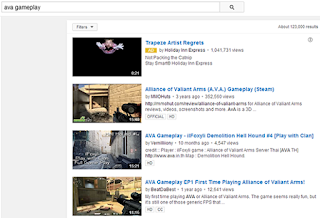 Where is the proof that it works?
Well, that's how I started out my YouTube career, and my first video is the third result for a search of "AVA Gameplay", so I'd consider it to be pretty successful! Check out the picture on the right to see me in the third spot!
Some of the key things to remember when doing this are:
- Make your first video absolutely amazing. Plan for it way ahead of time, and try to make it as good as you possibly can. You will receive the most views on this video, and if it's bad it won't convert as well
- I regret not making my first video as good as I could've, because I think I lost loads of possible subscribers by hurrying it (Don't make the same mistake as me!)
- Make sure you respond to the comments!
- Post your video on the forum of the game (if the forum allows it). That should give you a couple quick views.
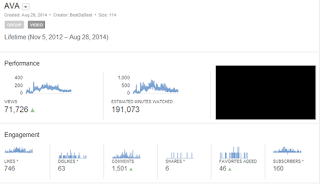 For those of you still undecided, here is the lifetime performance of all of the videos for the first FTP Online Game I started to play:
Sadly, you're not allowed to show your YouTube earnings, or else your account gets banned, but this is what I am allowed to show you guys.
As you can see these videos got me 71,000 views, 160 subs, and over 1500 comments!

- Make your first video absolutely amazing. Plan for it way ahead of time, and try to make it as good as you possibly can. You will receive the most views on this video, and if it's bad it won't convert as well
- I regret not making my first video as good as I could've, because I think I lost loads of possible subscribers by hurrying it (Don't make the same mistake as me!)
- Make sure you respond to the comments!
- Post your video on the forum of the game (if the forum allows it). That should give you a couple quick views.
 For those of you still undecided, here is the lifetime performance of all of the videos for the first FTP Online Game I started to play:
2. Flash Games (Yes, Flash Games!)
Some people scoff at the idea of making flash game gameplay for YouTube. However, if you are one of the first people to post a video for a specific flash game, you can get a lot of views!
For this, it's very important to use the YouTube Search Check to make sure that you will be one of the first people posting the video for the game.
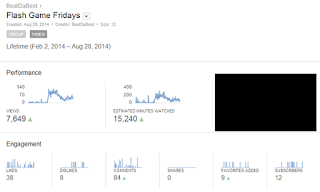
They only drove 12 subscribers, but I got almost 8,000 views from them!
The funny thing is: I have 3 popular videos, but the rest have 20 views. The reason for the success of those 3 videos, is the fact that I was the first person to upload it and act on it!
 I have the number 1 ranking for the search "Soccer Physics PC", over guys like: PewDiePie, MarkPlier, and other popular gamers.
Do they have more views than me? Of course... They have way more subscribers.
However, I am still ranked number one for that keyword, and I don't think I'm going to get knocked down!
 I also have the 2nd ranking for Bucket Cop as shown on the right, and even though this game didn't bring me as many subscribers or viewers as the game that I'm about to show you, it's still nice to know that I will be at the top for this game for quite a while!
My most popular Flash Game video by far is my Dream Car Racing 2 video. It has around 6,200 views at the time of writing, and I'm ranked number one for the searches "Dream Car Racing 2, Dream Car Racing 2 Gameplay", and probably a couple more.
Another great thing about it is that since I gave it a catchy name: Flash Game Fridays, I am in the top 10 results and steadily climbing for that keyword.
 When I reach the top, I'm sure I will get even more viewers!
So how do you find flash games that don't have any videos for them yet, that people might search for?
Pick your favorite Flash Game website, I will use Kongregate because they have a very useful Hot New Games bar.
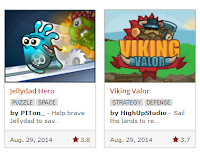 Basically, what I do is just log on to Kong from time to time, go to the Hot New Games section, and check out if there are any games posted TODAY.
If there are, I do a quick YouTube Search Check, and if there are any videos on it. If the coast looks clear, I record a quick video and post it on the same day!
 The sooner you post it, the higher the chance that you will be the most popular result for that game.
Just today, I went on and saw that Jellydad Hero was just uploaded on Kong and didn't have any videos on YouTube, so I went and created aquick video on it! Hopefully it'll start ranking soon.
Flash games are so great for views, that you could even create a very popular YouTube channel just for flash games! You could be very, very successful if you check for new ones every day and always do the YouTube search check!


 I have the number 1 ranking for the search "Soccer Physics PC", over guys like: PewDiePie, MarkPlier, and other popular gamers.
 However, I am still ranked number one for that keyword, and I don't think I'm going to get knocked down!
 I also have the 2nd ranking for Bucket Cop as shown on the right, and even though this game didn't bring me as many subscribers or viewers as the game that I'm about to show you, it's still nice to know that I will be at the top for this game for quite a while!
 When I reach the top, I'm sure I will get even more viewers!
 Basically, what I do is just log on to Kong from time to time, go to the Hot New Games section, and check out if there are any games posted TODAY.The sooner you post it, the higher the chance that you will be the most popular result for that game.
3. Reach Out To Indie/Kickstarter Games In Development
If you are the only one to create a video for an indie game in devolpment, you pretty much have it made.
All you have to do is:
- Reach out to the game developer through e-mail/facebook
- Tell him that:
- You have a YouTube channel and he will get free publicity from the video
- You love his game design/idea/whatever. (Make sure this is actually true though, you don't want to make a review of a game you think you would dislike)
- You would be very grateful if he could send you a Beta/Alpha version of the game before everyone else (Of course you'll link to his campaign/game in the description of your video)
- Sit patiently and hope for a positive response
- If it's positive: Thank them profusely and say you can't wait to record some gameplay.
- If it's not positive: Thank them profusely for taking their time to answer your email and say you can't wait to play their game when it does come out.
A sample email could go like this:
Hello, [Game Creator], I am the owner of the YouTube channel [MyChannel], and I would love to create a review of your work-in-progress. I can't wait to play it, and I think it would be great for your publicity. I'd obviously leave a link to [Your Game] in the description of my video. Thank you for your time!
The email is short, to-the-point, and easy to understand. Of course you could always personalize it more, but make sure that the reader will understand what you want from him within the first sentence or two.
- Reach out to the game developer through e-mail/facebook
- Tell him that:
- You have a YouTube channel and he will get free publicity from the video
- You love his game design/idea/whatever. (Make sure this is actually true though, you don't want to make a review of a game you think you would dislike)
- You would be very grateful if he could send you a Beta/Alpha version of the game before everyone else (Of course you'll link to his campaign/game in the description of your video)
- Sit patiently and hope for a positive response
- If it's positive: Thank them profusely and say you can't wait to record some gameplay.
- If it's not positive: Thank them profusely for taking their time to answer your email and say you can't wait to play their game when it does come out.
4. Anything That Passes The YouTube Search Check
Basically anything that passes the search check is good for getting more viewers and subscribers.
However, don't just pick games you don't want to play, just because you think you might rank high for them.
If you're not enjoying the game, your viewers won't enjoy the gameplay (Unless your trademark is dissing every game you play.)
Is This The End?
We're almost there! Bear with me here!
Here's a quick summary of what you should and shouldn't record, and how you should go about figuring out if something is worth recording if it's not on this list.
There are also some bonus tips at the end of this section, so stay tuned in!
Do Not Record:
- Games Already Recorded By Big YouTube Channels
- Popular Games That Just Came Out
Do Record:
- A Series Of FTP Online Games
- Flash Games
- Indie Games (Both In Development And Just Released)
- Any Topic That Passes The YouTube Search Check
What if the game is not on this list?
Number 4 in the Do Record box mostly takes care of it, but if you want to be more detailed, you should do some keyword research.
- Games Already Recorded By Big YouTube Channels
- Popular Games That Just Came Out
Do Record:
- A Series Of FTP Online Games
- Flash Games
- Indie Games (Both In Development And Just Released)
- Any Topic That Passes The YouTube Search Check
What if the game is not on this list?
Number 4 in the Do Record box mostly takes care of it, but if you want to be more detailed, you should do some keyword research.
Bonus Information!
How To Rank Your Video On Google
You know what's better than being on the first page of YouTube for a keyword?
Being on the first page of Google for a keyword! However, what's the keyword/video title you should use to be able to get to the first page of Google?
As always there are a couple simple steps:

Top 3 on YouTube for AVA Gameplay,
but nowhere to be found on Google...
- Do the YouTube search check first to see if you can be in the top 3 of the results. (Even if you're in the top 3 on YouTube, it doesn't necessarily mean you will be in the top 3 videos on Google for the same search.)
- Do a Google search for "[Your Game Name] Gameplay", why are we using this format? Because YouTube gives priority to video results with the following keywords:
- Gameplay
- Tutorial
- How To
- Unboxing
- If there are already a couple videos in the results and you think you have a good chance of beating them, you should make the video!
- If there are no videos in the results, but it is a combination of the game-name and the 4 keywords I mentioned before. You should definitely make the video!
Having your video rank in the top 10 on Google can double your traffic in some cases, so if you want to do that, you can check out the software called Market Samurai, and read my post on using it to improve your YouTube rankings here!
One last tip that I have for you guys is to create closed captions for your video if you're trying to make it rank higher.
Why?
Simply because it gives Google more data to work with when trying to understand what your video is about, and if you say the keyword you're trying to rank for, a couple times in the video, it could bump you up in the rankings!
Wow! This is the longest post I have ever created! I tried to make it as information-packed as possible, but if you think I missed something or if you liked it please comment!
 |
| Top 3 on YouTube for AVA Gameplay, but nowhere to be found on Google... |
- Do the YouTube search check first to see if you can be in the top 3 of the results. (Even if you're in the top 3 on YouTube, it doesn't necessarily mean you will be in the top 3 videos on Google for the same search.)
- Do a Google search for "[Your Game Name] Gameplay", why are we using this format? Because YouTube gives priority to video results with the following keywords:
- Gameplay
- Tutorial
- How To
- Unboxing
- If there are already a couple videos in the results and you think you have a good chance of beating them, you should make the video!
- If there are no videos in the results, but it is a combination of the game-name and the 4 keywords I mentioned before. You should definitely make the video!
Thank You For Reading!
Subscribe to:
Posts (Atom)