
 What do you do to pick keywords for your YouTube video?
Do you put random words? Use the YouTube Search Check? Use VidIQ to check your competitors keywords?
I use all of the above strategies, but another tool that I found out not long ago is called VideoLC.
It is a paid service, but they have a very general 30 day trial that I'm using right now to rank my videos, find the best time to post my videos, and see whether my videos are going up in rank or not.
You can greatly improve your channel without buying any licenses! The 30 day trial is more than enough to do all of the things I describe below!
It's an incredibly versatile tool, and in the 30 days that you get the free trial for, there are loads of things you can do to improve your channel. (I' m considering buying the cheapest monthly subscription when I have a steady income)
How To Pick Keywords
 If you've read my blog before, you'll know that I like to utilize the YouTube Search Check to see which keywords are low competition and post videos based on that keyword.
VideoLC greatly simplifies your job of keyword searching.
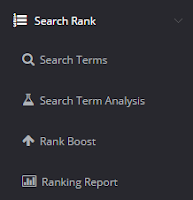
All you have to do is go to the search rank button and then click on the Rank Boost button.
We're not using it for boosting your rank just yet, that's the next section, but we will be using their rank boosting tool for keyword researching.
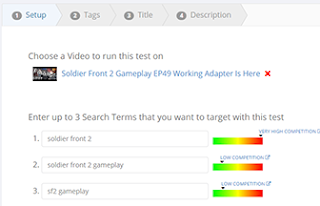
When you're there, click on the Add A Rank Boost button, and you'll be taken to a page that looks like the one to the right except your fields will be empty.
 Since you're not actually trying to improve the rank of your video, you can choose whatever video you want. Don't worry, this won't affect your video whatsoever.
There's a box where you can enter search terms that "you want to target", but we'll be using it to see what kind of competition a keyword has.
For this example I will be using keywords actually related to my video, but you can research any keyword you want.
What happens after you enter your keyword is pretty self-explanatory, but here are some simple details on it.

As you can see, trying to rank my video for the tag "soldier front 2" would be nearly impossible unless you're already a very successful channel.'
That keyword has very high competition, so that's not something you'd want to focus on.

The tag "soldier front 2 gameplay" has much lower competition, and it's much easier to rank for it.

And the tag "sf2 gameplay" isn't bad either!
How would you use this?
When looking for a game to record, you can visit this website and see if you have any chance in ranking high for the game you're about to play.
For example, let's say you want to play one of the Indie games shown below found on the Desura website.

You could put in the game names with gameplay at the end of them and see how high the competition is.

Looking at the above results, it looks like playing the game called So Many Me is a terrible idea if you're trying to get some views from YouTube search.
Playing Pall seems like a pretty good option, and playing The Scarecrow Man is a fairly good idea!
How To Find The Best Time To Post Your Videos
I've often heard people ask how to determine the best time for posting your videos, and it is quite hard to do it all by yourself.
However, VideoLC does all of the heavy lifting for you and all you have to do is click a button and view the amazing results!
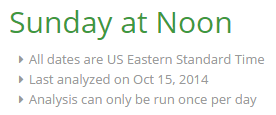 Just go to the Channel menu and click on Best Time To Upload.
You'll get a message about your best time for uploading, (Mine is on Sunday between 12 and 1) and below that you will find numerous details about your engagement based on the day of the week.
 Most of my engagement seems to happen on Sundays, which is why this app told me that my best bet is publishing my video on a Sunday!
Now you could analyze it all yourself, or write your own program to do it for you, but I prefer not reinventing the wheel if what I want is already out there.
Check How Your Videos' Rank Is Changing
You can also use VideoLC to track the changes in your videos' rankings.
The only disadvantage to this feature is that it only tracks videos in the top 50 for a certain keyword, so if your video isn't already ranked fairly high, you're out of luck!
To do this, go into the Search Rank menu and click on Ranking Report.
If it's your first time going here, you'll have to choose the keywords for this tool to check for, and you'll have to wait a couple days for it to see whether your rankings are changing or not.
Thank you for reading and I hope this post was useful to you!
You can click below to subscribe to my newsletter if you would like to get case-studies and tips like these delivered straight to your inbox!
You can greatly improve your channel without buying any licenses! The 30 day trial is more than enough to do all of the things I describe below!
It's an incredibly versatile tool, and in the 30 days that you get the free trial for, there are loads of things you can do to improve your channel. (I' m considering buying the cheapest monthly subscription when I have a steady income)
How To Pick Keywords
 If you've read my blog before, you'll know that I like to utilize the YouTube Search Check to see which keywords are low competition and post videos based on that keyword.
VideoLC greatly simplifies your job of keyword searching.
All you have to do is go to the search rank button and then click on the Rank Boost button.
We're not using it for boosting your rank just yet, that's the next section, but we will be using their rank boosting tool for keyword researching.
When you're there, click on the Add A Rank Boost button, and you'll be taken to a page that looks like the one to the right except your fields will be empty.
 Since you're not actually trying to improve the rank of your video, you can choose whatever video you want. Don't worry, this won't affect your video whatsoever.
There's a box where you can enter search terms that "you want to target", but we'll be using it to see what kind of competition a keyword has.
For this example I will be using keywords actually related to my video, but you can research any keyword you want.
What happens after you enter your keyword is pretty self-explanatory, but here are some simple details on it.

That keyword has very high competition, so that's not something you'd want to focus on.

The tag "soldier front 2 gameplay" has much lower competition, and it's much easier to rank for it.

How would you use this?
When looking for a game to record, you can visit this website and see if you have any chance in ranking high for the game you're about to play.
For example, let's say you want to play one of the Indie games shown below found on the Desura website.

You could put in the game names with gameplay at the end of them and see how high the competition is.

Playing Pall seems like a pretty good option, and playing The Scarecrow Man is a fairly good idea!
How To Find The Best Time To Post Your Videos
I've often heard people ask how to determine the best time for posting your videos, and it is quite hard to do it all by yourself.
However, VideoLC does all of the heavy lifting for you and all you have to do is click a button and view the amazing results!
Just go to the Channel menu and click on Best Time To Upload.You'll get a message about your best time for uploading, (Mine is on Sunday between 12 and 1) and below that you will find numerous details about your engagement based on the day of the week.

Now you could analyze it all yourself, or write your own program to do it for you, but I prefer not reinventing the wheel if what I want is already out there.
Check How Your Videos' Rank Is Changing
You can also use VideoLC to track the changes in your videos' rankings.
The only disadvantage to this feature is that it only tracks videos in the top 50 for a certain keyword, so if your video isn't already ranked fairly high, you're out of luck!
To do this, go into the Search Rank menu and click on Ranking Report.
If it's your first time going here, you'll have to choose the keywords for this tool to check for, and you'll have to wait a couple days for it to see whether your rankings are changing or not.
Thank you for reading and I hope this post was useful to you!
You can click below to subscribe to my newsletter if you would like to get case-studies and tips like these delivered straight to your inbox!


